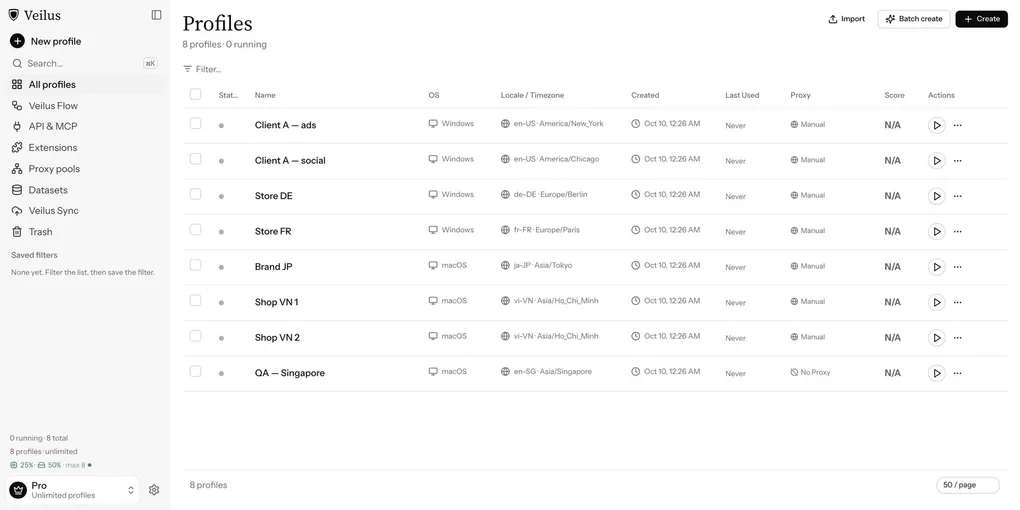
Test Your Site in Eight Languages and Time Zones Without Eight Laptops
A site that looks right in your own browser can still greet a visitor in Tokyo with the wrong language, show a date as 10/14 instead of 14/10, or redirect a German visitor to the English page. Your browser only shows you one language and one timezone: yours.
This post walks through checking that from one computer with Veilus. Each browser profile carries its own language and timezone, so a set of profiles becomes a set of visitors from different places, and one Playwright script checks all of them.
What a profile changes, and what it doesn’t
When you create a profile, the Language & Region step sets two things websites read from the browser:
- Language: the browser language a site sees, which drives
navigator.languageand the language a site picks when it follows the browser. - Timezone: the timezone a site sees, which drives how
Dateformats times. The profile’s coordinates follow the timezone.
Click a market to fill both at once, or set them yourself. A Config check under the fields flags contradictions, such as a language that doesn’t match the timezone. See Fingerprinting.
What a profile doesn’t change is your IP address. A site that picks the language or currency from the visitor’s IP still sees where your network exits. If that matters for what you’re testing, give each profile a proxy in its region (Proxy).
That also matters for one setting. Before every launch, Veilus compares the profile’s timezone with where its proxy, or your own network, exits. The default is Block: a Tokyo profile on a Vietnamese connection won’t open. For local QA without regional proxies, set Settings → Timezone check to Warn or Off first.
Step 1: create one profile per market
Create one profile for each market you ship to: pick the operating system and a market. On a paid plan or the trial, Batch create makes up to 50 at once. For example, ja-JP with Asia/Tokyo, de-DE with Europe/Berlin, pt-BR with America/Sao_Paulo. Tag them l10n so you can select them together later (Create profiles). On each profile’s Automation tab, add a variable EXPECT_LANG with the language that market should get, for example ja.
The Free plan covers 5 profiles, enough for five markets. Running a script on them needs a paid plan or the 7-day Pro trial.
Step 2: write one check
A Veilus script is an ordinary Playwright program. It connects to the profile’s browser on the port Veilus passes in, and prints what you want to read back:
import { chromium } from "playwright";

async function main() {
  const browser = await chromium.connectOverCDP(
    `http://127.0.0.1:${process.env.VEILUS_DEBUG_PORT}`,
  );
  const context = browser.contexts()[0];
  const page = context.pages()[0] ?? (await context.newPage());

  await page.goto(process.env.VEILUS_VAR_URL ?? "https://example.com/");
  const report = await page.evaluate(() => ({
    url: location.href,
    htmlLang: document.documentElement.lang,
    browserLang: navigator.language,
    timeZone: Intl.DateTimeFormat().resolvedOptions().timeZone,
    sampleDate: new Date(Date.UTC(2026, 9, 14, 9, 30)).toLocaleString(),
  }));
  console.log(JSON.stringify(report));

  const expected = process.env.VEILUS_VAR_EXPECT_LANG;
  if (expected && !report.htmlLang.startsWith(expected)) {
    console.error(`expected ${expected}, page declares "${report.htmlLang}"`);
    process.exitCode = 1;
  }

  await browser.close();
}

main().catch((e) => {
  console.error(e);
  process.exit(1);
});
Each profile prints one line: where the site sent it, which language the page declared, and how a fixed moment renders in that profile. If the page declares a different language from EXPECT_LANG, the script exits with code 1 and that profile fails. The URL comes from a variable, so the same script checks staging and production (Scripts).
You can also ask an AI assistant to write it. Connect Claude Code or Cursor over MCP and describe the check in a sentence; it can trial-run the script on up to 3 profiles and fix its own errors before you look (MCP setup).
Step 3: run it on every market
Approve the script in Veilus Flow, then run it on the l10n profiles. In the Run dialog, Concurrency sets how many profiles run at once (1, 2, 3, 4, 5, 8 or 10). Click the run to see each profile’s exit code and its output, one JSON line per market (Runs).
Things worth reading in that output:
urldiffers between markets when the site redirects by language. Check each market lands where you expect.htmlLangshould match the page’s real language. A German page that still sayslang="en"hurts both screen readers and search engines.sampleDateis the same instant in every profile. If the page formats dates itself, compare its text with this.
Step 4: keep it running
Put the approved script on a schedule, for example daily, so a broken translation or redirect shows up as a failed profile instead of a customer email (Schedules).
Where to go next
- Create profiles and the Timezone check
- What a script receives
- Download Veilus, free for 5 profiles